XGR Builder 137 — Overview
This page gives you a high-level tour of the Builder 137 UI: what each section does, how the four-step flow works, and how to use the right‑side dock to show/hide panels. It links to the detailed guides for every panel.
What the page looks like
What you see
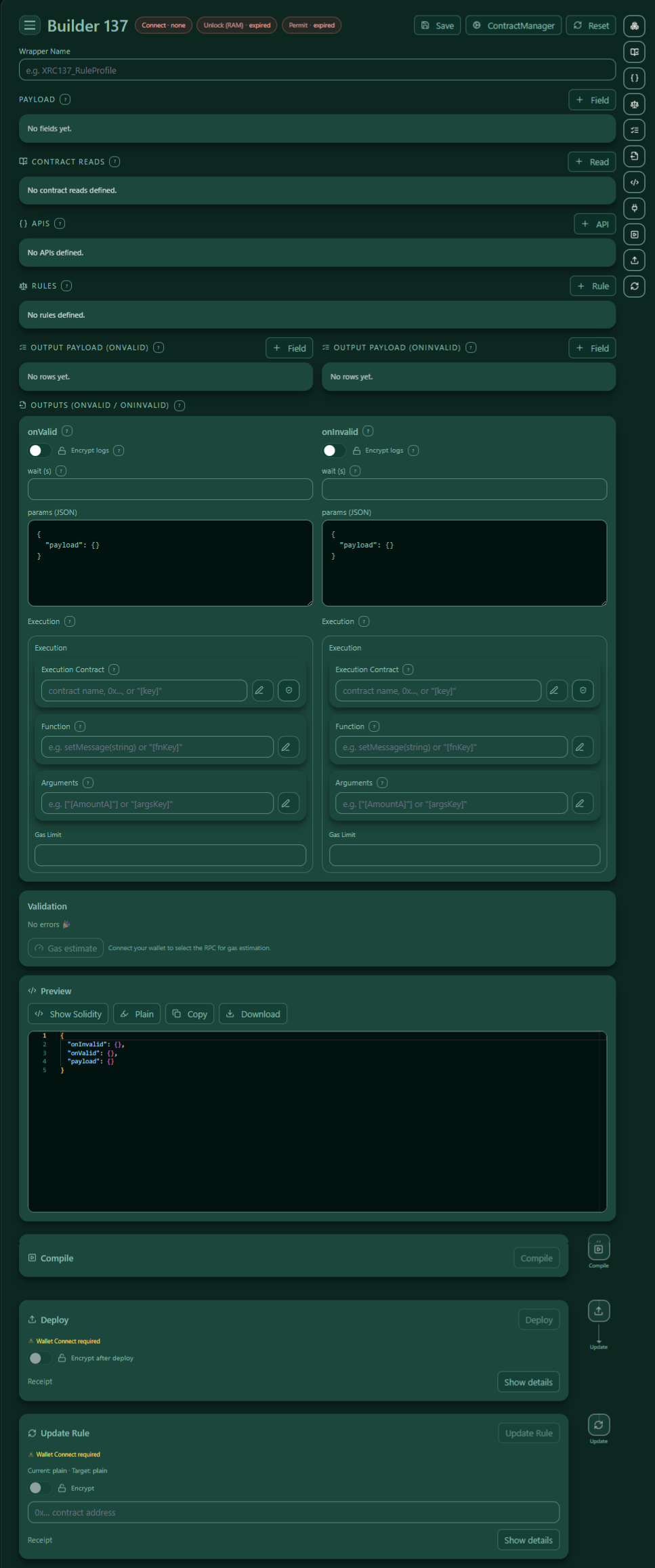 — The Builder page with creation panels on the left (Payload, Contract Reads, APIs, Rules, Outputs, Validation, Preview) and the operational panels below (Wallet Connect, Compile, Deploy, Update). The vertical flow on the right shows Wallet → Deploy → Update.
The four-step flow
Builder 137 guides you through these steps in order:
- Wallet — connect a browser wallet (e.g., MetaMask) and select a chain.
- Deploy — deploy the wrapper contract (plain or encrypted).
- Update — push rule changes to an existing contract (plain or encrypted).
The flow highlights the next active step and places a check mark after each successful action. If Validation finds errors.
Detailed guides:
• Wallet →XGR-Wallet-Connect-Guide.md
• Compile →XGR-Compile-Guide.md
• Deploy →XGR-Deploy-Guide.md
• Update →XGR-Update-Guide.md
The creation panels (top)
- Payload — define input fields available to rules.
- Contract Reads — read on-chain data; store outputs via
saveAsaliases or indices. - APIs — call external APIs and extract data into aliases.
- Rules — build boolean logic using payload fields, read keys, and API extraction results.
- Outputs — define
onValid/onInvalidpayloads and optional encrypted logs with expiry. - Validation — live checks with actionable messages; blocks Compile on errors.
- Preview — view/copy/download the normalized JSON and generated Solidity wrapper.
The right-side dock (icon menu)
Use the dock to toggle panel visibility (desktop) or the small mobile bar (phones). Hover to see the label; click to show/hide a section. The Read Key tab appears only when opened.
What you see
 — Dock icons from top to bottom: Creation, Contract Reads, APIs, Rules, Code Preview, Wallet, Compile, Deploy, Update (and Read Key when open). Active items are highlighted; done steps also show as completed in the flow.
Icons
- Creation (boxes): show/hide the creation stack (Payload → Validation).
- Contract Reads (book‑check): toggle contract reads panel.
- APIs (braces): toggle APIs panel.
- Rules (scales): toggle rules panel.
- Code Preview (): toggle preview (JSON/Solidity).
- Wallet (plug): toggle wallet panel.
- Compile (play): toggle compile panel.
- Deploy (upload): toggle deploy panel.
- Update (refresh): toggle update panel.
- Read Key (key): appears when the Read‑Key window is open; click to minimize/show.
Tips
- Keep an eye on Validation before compiling.
- Use Testnet for trial runs; switch to Mainnet when ready.
- For encrypted operations, see Encryption & Grants → https://xgr.network/docs.html#xrc563
Last updated: 2025-10-19