XGR Compile — How to compile your contract
This guide explains what the Compile panel does, how to start a compilation, and what the individual outputs mean.
1) Prerequisites
- Wallet connected (first step in the flow) — otherwise Compile may be blocked by validation.
- A valid model (no blocking errors). The Compile button is disabled when validation finds blocking issues.
2) Start compilation
Open the Compile panel and click Compile. During compilation you’ll see Compiling…. After success, the compact status indicator shows ✓ Compiled.
What you see
 — Compile panel with the Compile button on the right and a compact ✓ Compiled success indicator at the top once it’s finished.
3) Show details & outputs
With Show details, you reveal the artifacts. You can Copy or Download each section.
- Model (JSON) — the normalized builder configuration used to generate the artifacts
- Wrapper (Solidity) — generated wrapper source for quick deploys/tests in EVM tools
- ABI — contract interface as JSON (for SDKs, frontends, scripts)
- Bytecode — hex-encoded contract bytecode
What you see
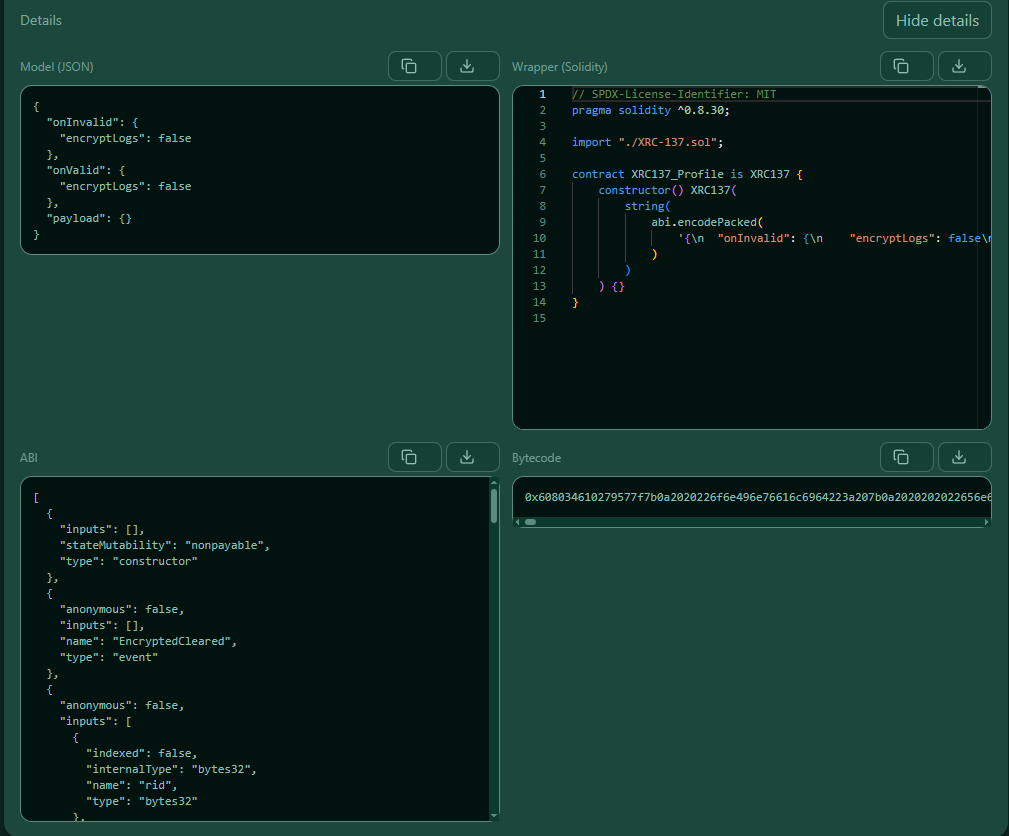 — Detail view with four sections, each with Copy and Download. The wrapper is rendered with Solidity syntax highlighting.
4) After compile: next steps
- Deploy — requires wallet connected; Compiled is not required.
- Update Rule — requires a deployed address and supports encrypted updates if your read key is verified.
Tip: You can open Show details at any time later to copy or download artifacts again.
Troubleshooting
- Compile button disabled → fix validation errors in the builder (Payload, Rules, Reads, APIs).
- No outputs in details → compile again; outputs appear only after a successful compilation.
- Wrapper looks unstyled → expected; the code preview uses a compact theme for readability.
About the compiler (XGR Hardhat Service)
- The Compile action runs against XGR’s managed Hardhat service.
- Your model is converted to Solidity and compiled server-side (no on-chain transaction required).
- The service uses a pinned toolchain (Hardhat/solc) for deterministic builds across environments.
- Outputs (Wrapper, ABI, Bytecode) are returned to the UI and can be copied or downloaded.
Security & privacy
- Compile requires no wallet signature and no gas; it only needs a connected wallet to validate the environment/chain.
- No private keys ever leave your browser. Only the generated source/model is sent to the compiler to produce artifacts.
- Artifacts are server-side ephemeral (stateless build job) and are displayed locally in the panel.