XGR Contract Reads (UI Guide)
This guide explains how to configure on-chain Contract Reads in the XRC-137 Builder UI so they match the engine (parser + reads executor).
1) What a Contract Read is
A Contract Read calls a view/pure function on an EVM-compatible chain and maps the returned tuple via saveAs. Reads typically run before API Calls.
What you see
 — Contract Reads panel with one configured row and “Add Read” button.
2) Fields in the UI (engine-aligned)
| Field | Required | Notes |
|---|---|---|
| To | yes | Contract address (0x + 40 hex). |
| Function | yes | name(type1,type2,…)(ret1,ret2,…) |
| Args | yes | Array of typed arguments: { "type": "...", "value": "..." } (placeholders allowed). |
| saveAs | yes | Map of return index → output definition { key, type, default? }. |
| RPC | no | HTTPS endpoint; EVM-compatible only. |
What you see
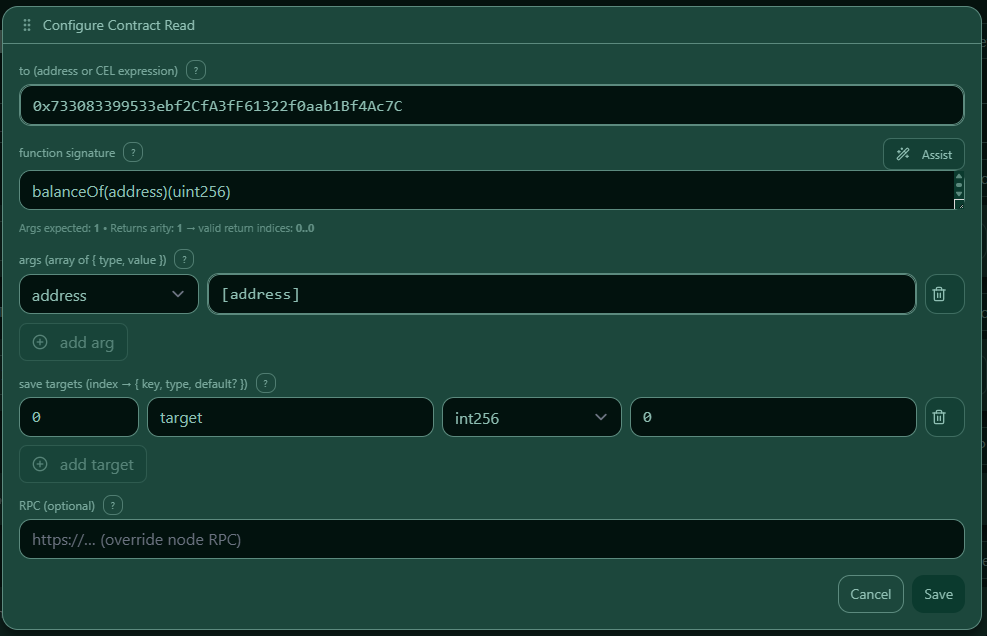 — “Edit Contract Read” modal with all fields and validation hints.
3) Function signature & args
Function format
Use the function signature in this format:
name(type1,type2,…)(ret1,ret2,…)
Examples:
- balanceOf(address)(uint256)
- balanceOf(address,address)(uint256,int256)
Args format
args must match the function input types (same order, same count). Each arg entry contains:
type— ABI input type (e.g.address,uint256,bytes32)value— literal value or placeholder (e.g.[address])
No inputs? Use "args": [] and a function like symbol()(string).
What you see
 — Helper modal with empty inputs and a
 fn() (...) preview.
4) Mapping results with saveAs
saveAs maps return tuple indices to named outputs.
- Use
"0"for the first return value,"1"for the second, etc. - Each mapped output defines:
key— the placeholder name you will use later (e.g.[target])type— the output type (XRC-137 payload type)default(optional) — used when the read does not provide a value for this output
saveAs.*.type uses Payload types
saveAs.<index>.type uses the same type values as the Payload panel. Use the type that matches the returned value so downstream Rules, API expressions, and outcomes interpret it correctly.
Supported type values:
stringboolint64int256uint64doubledecimaltimestamp_msduration_msuuidaddressbytesbytes32uint256
Key rules
- Keys are case-sensitive
- Allowed pattern (UI & engine): ^[A-Za-z][A-Za-z0-9]*$ (letters & digits only)
- Keys must be unique within the rule model
What you see
 — Table mapping tuple indices to output keys and types.
5) Defaults (per output)
Defaults are set per saveAs output using saveAs.<index>.default.
- Defaults are optional.
- If a default is set, it is used only when the read output is missing/empty.
What you see
 — Default values per output with type-aware hints.
6) RPC (optional)
If set, rpc overrides the default RPC for this read.
- Must be HTTPS
- Must be EVM-compatible
What you see
 — RPC input with info “EVM-compatible only”.
7) Placeholders [key] in args
You can use placeholders inside argument values.
Sources:
- runtime payload (Payload panel)
- earlier contract reads (saveAs outputs)
- earlier API extracts
What you see
 — Tooltip with the three sources and examples.
8) Validation (what the UI enforces)
tomust be a valid EVM address.functionmust be a complete signature inname(...)(...)format.argsmust match the function input types (same count and ABI types).saveAsmust exist and must not contain duplicate indices or duplicate keys.rpcis optional; if set it must be a valid HTTPS URL.
What you see
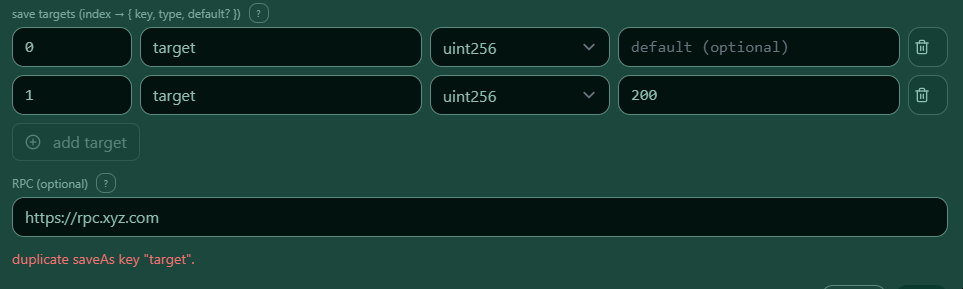 — Example errors for invalid signatures, duplicate keys, etc.
9) Examples
A) Contract Reads panel example (single arg, single return)
{
  "contractReads": [
    {
      "args": [
        {
          "type": "address",
          "value": "[address]"
        }
      ],
      "function": "balanceOf(address)(uint256)",
      "saveAs": {
        "0": {
          "default": 0,
          "key": "target",
          "type": "int256"
        }
      },
      "to": "0x733083399533ebf2CfA3fF61322f0aab1Bf4Ac7C"
    }
  ],
  "onInvalid": {},
  "onValid": {},
  "payload": {
    "address": {
      "type": "address"
    }
  }
}
What you see
B) Save As and Defaults example (two args, two returns)
{
  "contractReads": [
    {
      "args": [
        {
          "type": "address",
          "value": "[address]"
        },
        {
          "type": "address",
          "value": "[address2]"
        }
      ],
      "function": "balanceOf(address,address)(uint256,int256)",
      "saveAs": {
        "0": {
          "key": "target",
          "type": "uint256"
        },
        "1": {
          "default": 200,
          "key": "target1",
          "type": "uint256"
        }
      },
      "to": "0x733083399533ebf2CfA3fF61322f0aab1Bf4Ac7C"
    }
  ],
  "onInvalid": {},
  "onValid": {},
  "payload": {
    "address": {
      "type": "address"
    },
    "address2": {
      "type": "address"
    }
  }
}
What you see
C) RPC field example
{
  "contractReads": [
    {
      "args": [
        {
          "type": "address",
          "value": "[address]"
        },
        {
          "type": "address",
          "value": "[address2]"
        }
      ],
      "function": "balanceOf(address,address)(uint256,int256)",
      "rpc": "https://rpc.xyz.com",
      "saveAs": {
        "0": {
          "key": "target",
          "type": "uint256"
        },
        "1": {
          "default": 200,
          "key": "target1",
          "type": "uint256"
        }
      },
      "to": "0x733083399533ebf2CfA3fF61322f0aab1Bf4Ac7C"
    }
  ],
  "onInvalid": {},
  "onValid": {},
  "payload": {
    "address": {
      "type": "address"
    },
    "address2": {
      "type": "address"
    }
  }
}
What you see
D) Example cards
What you see
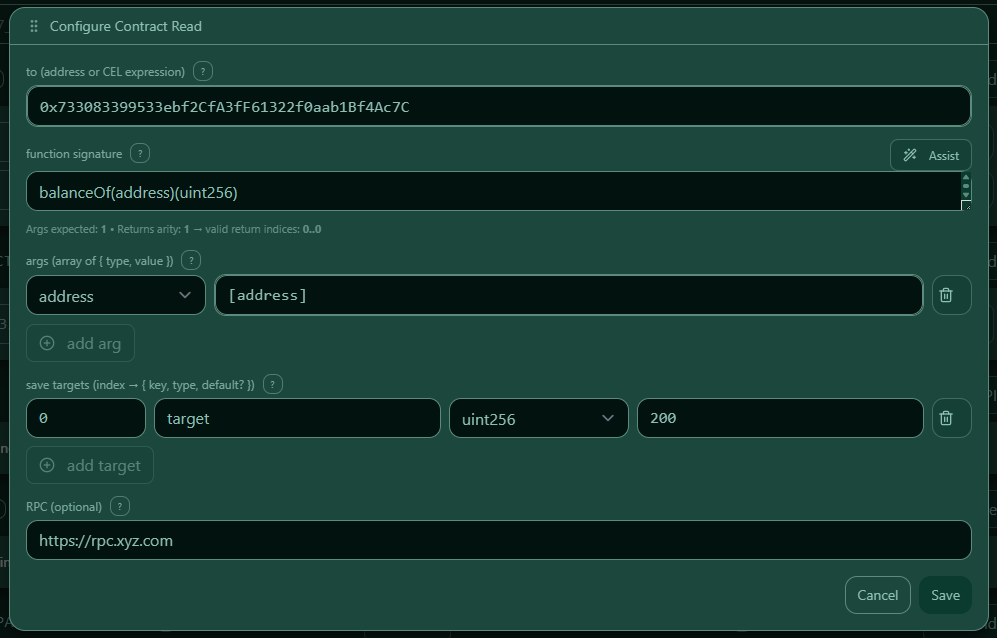 — Example card (single return).
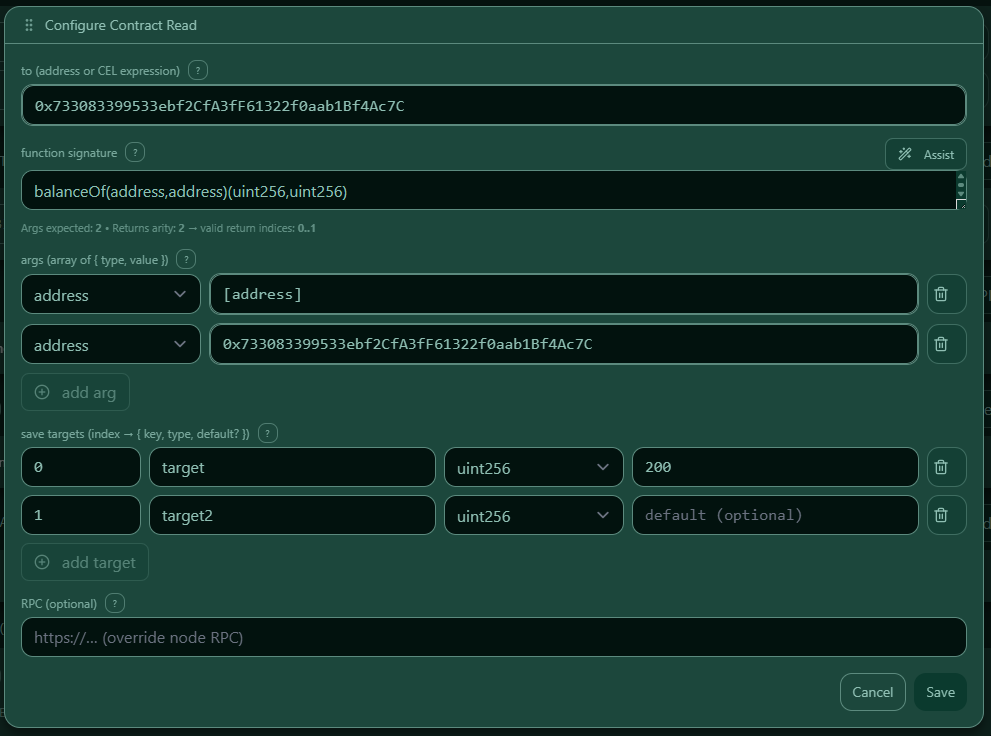 — Example card (two returns).
Example 1
{
  "contractReads": [
    {
      "args": [
        {
          "type": "address",
          "value": "[address]"
        }
      ],
      "function": "balanceOf(address)(uint256)",
      "rpc": "https://rpc.xyz.com",
      "saveAs": {
        "0": {
          "default": 200,
          "key": "target",
          "type": "uint256"
        }
      },
      "to": "0x733083399533ebf2CfA3fF61322f0aab1Bf4Ac7C"
    }
  ],
  "onInvalid": {},
  "onValid": {},
  "payload": {
    "address": {
      "type": "address"
    },
    "address2": {
      "type": "address"
    }
  }
}
Example 2
{
  "contractReads": [
    {
      "args": [
        {
          "type": "address",
          "value": "[address]"
        },
        {
          "type": "address",
          "value": "0x733083399533ebf2CfA3fF61322f0aab1Bf4Ac7C"
        }
      ],
      "function": "balanceOf(address,address)(uint256,uint256)",
      "rpc": "https://rpc.xyz.com",
      "saveAs": {
        "0": {
          "default": 200,
          "key": "target",
          "type": "uint256"
        },
        "1": {
          "key": "target2",
          "type": "uint256"
        }
      },
      "to": "0x733083399533ebf2CfA3fF61322f0aab1Bf4Ac7C"
    }
  ],
  "onInvalid": {},
  "onValid": {},
  "payload": {
    "address": {
      "type": "address"
    },
    "address2": {
      "type": "address"
    }
  }
}
10) Tips & Troubleshooting
- If reads fail, re-check function signature and ensure
args[*].typematches the signature exactly. - Prefer placeholders in args (e.g.
[address]) to avoid hard-coded values. - Use clear
saveAskeys likebalance,threshold,isAllowed. - If you use defaults, remember they apply per output via
saveAs.<index>.default.