XGR Deploy — How to Deploy Your Contract
This guide explains the Deploy panel (step 3 of 4 in the flow: Wallet → Deploy → Update). It covers both a standard deploy and the optional encrypted deploy, including Read‑Key requirements, expiry time, and the on‑chain steps.
Where Deploy Fits in the Flow
The builder shows your progress on the right: Wallet → Deploy → Update. Deploy becomes active as soon as your wallet is connected.
What you see
 — A three-step flow; Deploy is highlighted once Wallet (1) is done.
1) Prerequisites
- Wallet connected (step 1)
If this prerequisite is missing, the Deploy button is disabled and a short hint is shown below it.
What you see
 — Deploy panel with the Deploy button (right), the Encrypt after deploy toggle, and a compact hint line when something is missing.
2) Standard Deploy (Without Encryption)
Click Deploy. Your wallet opens and asks you to send the deploy transaction. After you confirm, you will see:
- Tx (with explorer link and copy button)
- Contract address (with copy button)
- Network label
- a collapsible Receipt
What you see
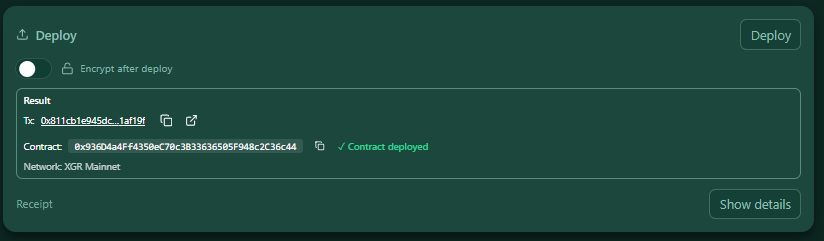 — Result box with the transaction hash and the deployed Contract address.
3) Encrypted Deploy (One‑Click Flow)
Enable Encrypt after deploy to store the rule encrypted immediately after deploying an empty contract. This requires a verified Read‑Key, and three steps will run automatically in sequence:
- Deploy an empty contract (no JSON on-chain yet) → tx
- Prepare encryption off-chain (creates
rid,suite, encryptedblob) → Permit required - Persist the encrypted rule to the contract (
blob/suite/rid) → tx
You can set an Expiry time (Years/Days). This controls the grant expiration of the owner permissions used for reading. You can also estimate the cost for the chosen expiry time via the Cost button.
If the XRC‑137 itself is encrypted, but the logs are currently marked as unencrypted in the Output Panel, you will see a hint:
Heads up: If you encrypt the contract, consider encrypting your output logs too (see Outputs → onValid / onInvalid).
This is only a reminder so you don’t forget to also encrypt log data if that’s desired.
With encryption enabled here, only the owner (and wallets authorized via grants) can read the rule JSON of the XRC‑137.
What you see
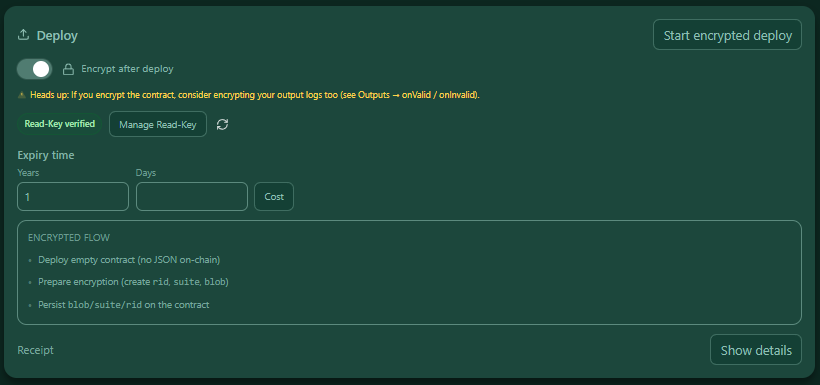 — Encrypt mode active: a Read‑Key status pill, Manage Read‑Key button, Refresh, inputs for Expiry time, and a mini Encrypted flow checklist that marks each step with a ✓ and shows a live status text.
Read‑Key required: When encryption is enabled, the Deploy button stays disabled until a valid Read‑Key is verified. Use Manage Read‑Key to create/import a local key and register it on-chain.
4) Receipt Details
Use Show details to open the raw receipt (JSON) for inspection or support.
What you see
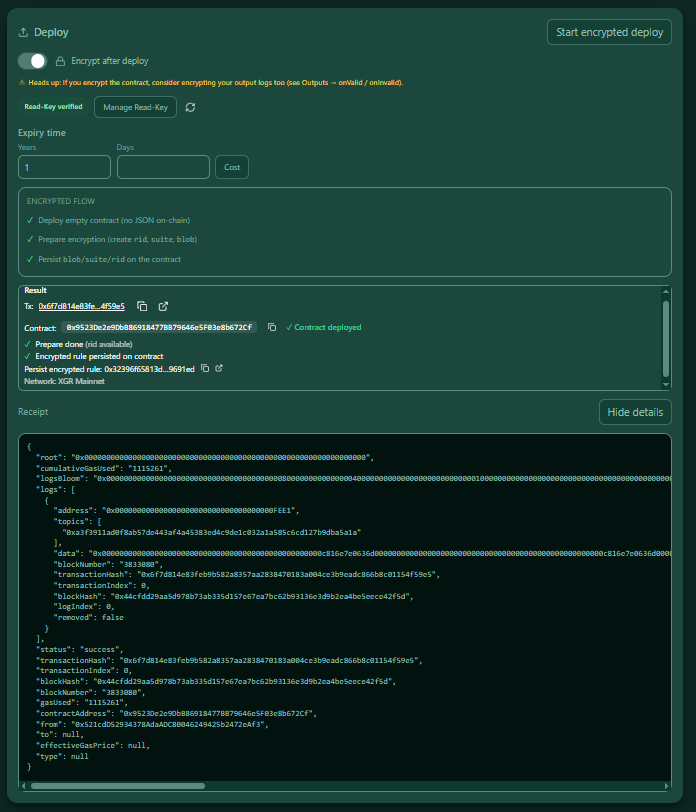 — Receipt details showing the full JSON.
Security & Privacy (Encryption)
- Your wallet must be connected; the encryption steps are on-chain and require explicit confirmation in your wallet.
- The Read‑Key is managed locally; registration is done via standard on-chain transactions.
- Grant expiry equals
(years * 365 + days) * 86400seconds (UTC). The UI writes the expiry into the encrypted-deploy call.
FAQ
Do I need encryption?
No. If Encrypt after deploy is off, the contract is deployed normally and you can later push rules via Update (plain or encrypted).
Why is the Deploy button disabled when encryption is on?
Because the Read‑Key must be verified first. Open Manage Read‑Key and follow the instructions.
Can I see all transaction hashes of the encrypted run?
Yes. The result box lists the primary deploy tx and the persist tx, each with explorer links.
Standard vs. Encrypted Deploy (and How Expiry Works)
You can deploy without encryption (plain) or with encryption:
- Standard deploy (plain): A normal deploy that creates the contract on-chain. No encrypted rule is stored yet. You can later push a rule via Update (plain or encrypted).
- Encrypted deploy: Enable Encrypt after deploy before clicking Deploy. A one-click sequence runs:
1) Deploy an empty rule contract
2) Encrypt your rule off-chain (creates RID, suite, encrypted blob)
3) Persist blob + suite + rid to your rule contract (XRC‑137)
Expiry controls how long your decryption right remains valid.
When you choose Years/Days in the UI, we calculate an expireAt timestamp and store it together with your owner grant. Until then, your wallet (with your local Read‑Key) can unwrap the content key and decrypt the rule. After the expiry time, the grant is inactive and clients refuse decryption by policy. You can extend access by writing a new grant (e.g., via Update).
Note: Technically, an older device that cached the encrypted key might still attempt to decrypt after expiry. However, apps and indexers rely on the on-chain expireAt policy and treat the grant as expired. A periodic sweeper also removes expired entries from the index to keep costs predictable.