XGR Payload (UI Guide)
This guide explains how to define Payload fields in the XRC-137 Builder and how those fields are reused via placeholders and autocomplete across Rules, API, Contract Reads, and outcomes.
1) What Payload does
Payload defines the runtime input fields your workflow can consume. Each field becomes available as a reusable placeholder in the form [key].
What you see
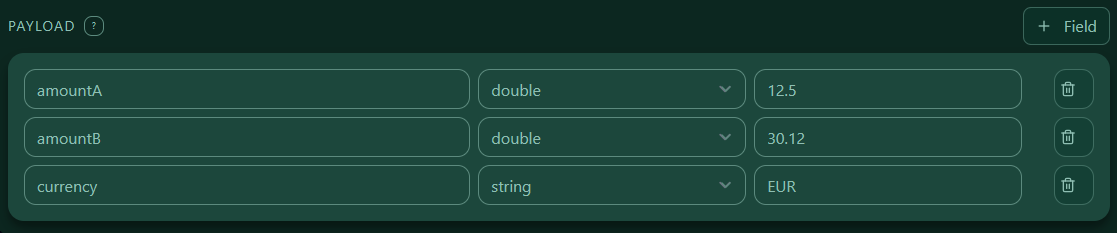 — The Payload panel with a list of fields and a “+ Field” button.
2) Add a field
Each row has three controls:
1) Name — the placeholder name you will use later as [name]
2) Type — the XRC-137 payload type (required)
3) Default (optional) — a value used when the runtime input does not provide this field
What you see
 — A single payload row: inputs for Name, Type (dropdown), and a Default input.
Tips
- Prefer short, clear names: amount, country, apiUrl.
- Pick the most natural type so comparisons and validations behave as expected.
- Use Default for values that should be applied automatically when the caller does not provide a field.
3) Naming rules (case-sensitive)
Payload keys are case-sensitive and must be unique by exact spelling. The UI enforces a safe pattern and prevents accidental whitespace.
Allowed pattern
^[A-Za-z][A-Za-z0-9]{0,127}$
- must start with a letter
- letters and digits only
- max length 128
Duplicates
If you enter the same spelling twice (e.g., amountA twice), the UI shows a duplicate warning and only the first occurrence is exported. Different spellings (e.g., Amount vs. amount) are treated as different keys.
What you see
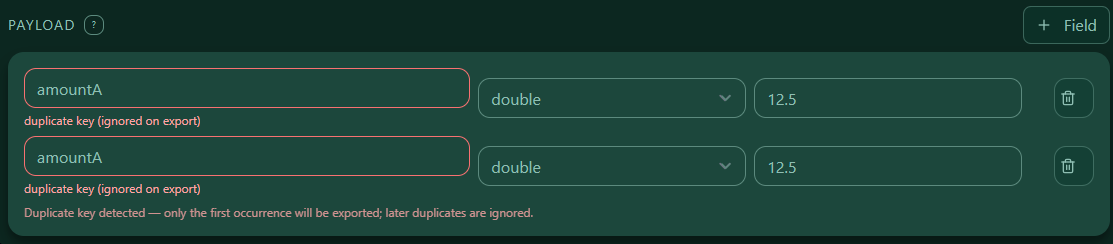 — A row with the “duplicate key (ignored on export)” hint.
4) Payload types
Payload fields are typed. Supported XRC-137 payload types:
stringboolint64int256uint64doubledecimaltimestamp_msduration_msuuidaddressbytesbytes32uint256
Notes:
- bytes, bytes32 and address are represented as strings in JSON (typically hex).
- timestamp_ms and duration_ms are milliseconds.
5) Defaults (optional)
The Default value is optional.
- If Default is set and the runtime input does not provide a value (or provides an empty value), the engine uses the Default.
- If Default is not set and the runtime input is missing/empty, the workflow evaluates as invalid and continues via onInvalid.
“Empty” means: null, empty string "", or empty arrays/maps. 0 is not empty.
6) How placeholders work
Anywhere the editor accepts placeholders, type [ to open autocomplete and insert available producers:
- Payload keys (this panel)
- Contract Reads saved as
saveAsaliases - API extracts defined in the API panel
Syntax
Write a placeholder as [name], e.g., [amount], [country].
What you see
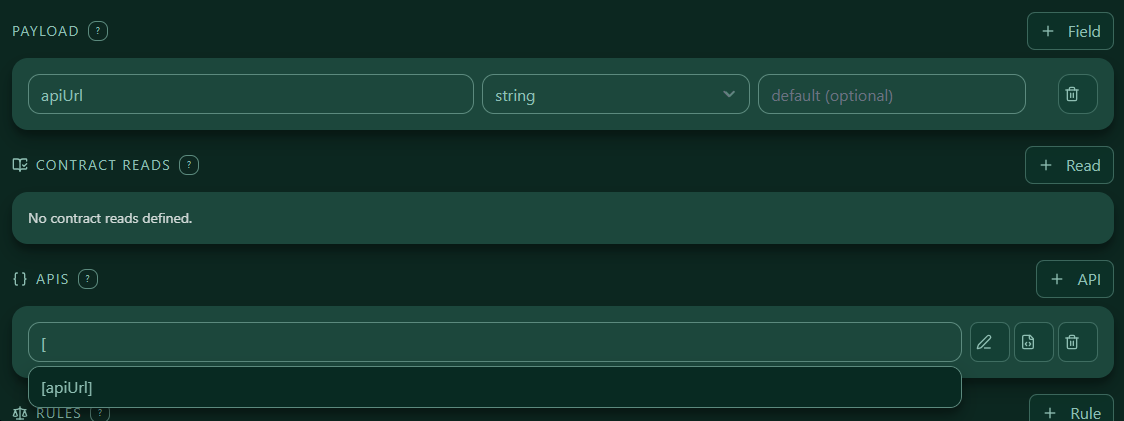 — Typing
 [ opens a suggestion list; Enter inserts a placeholder.
7) Where you will reuse Payload fields
You can reuse payload keys across the builder:
- Rules: compare values like
[amount] >= 100 - API panel: use placeholders in templates and expressions
- Contract Reads: pass payload values or compare against read aliases
- Outcomes: set output fields derived from payload and other producers
8) Required vs. defaulted (runtime behavior)
At runtime, each field follows this rule:
- Default not set + missing/empty input → workflow becomes invalid and continues via onInvalid
- Default set + missing/empty input → engine uses the Default value and continues normally
9) Examples
A) Main Payload example
{
  "onInvalid": {},
  "onValid": {},
  "payload": {
    "amountA": {
      "default": 12.5,
      "type": "double"
    },
    "amountB": {
      "default": 30.12,
      "type": "double"
    },
    "currency": {
      "default": "EUR",
      "type": "string"
    }
  }
}
B) Duplicate warning example
{
  "onInvalid": {},
  "onValid": {},
  "payload": {
    "amountA": {
      "default": 12.5,
      "type": "double"
    }
  }
}
C) Minimal payload

{
  "onInvalid": {},
  "onValid": {},
  "payload": {
    "amountA": {
      "default": 12.5,
      "type": "double"
    },
    "apiUrl": {
      "type": "string"
    }
  }
}
D) Placeholders in Rules and outcomes
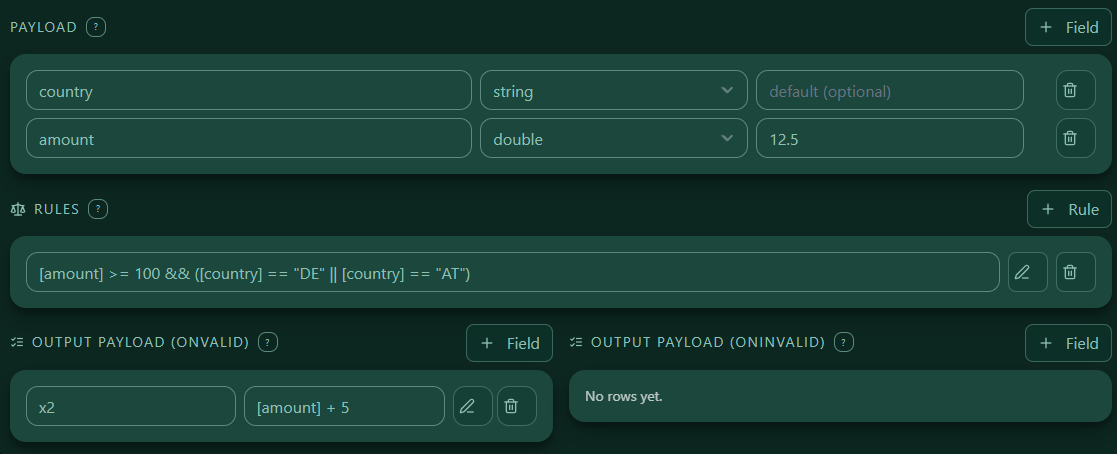
{
  "onInvalid": {},
  "onValid": {
    "payload": {
      "x2": "[amount] + 5"
    }
  },
  "payload": {
    "amount": {
      "default": 12.5,
      "type": "double"
    },
    "country": {
      "type": "string"
    }
  },
  "rules": [
    "[amount] >= 100 && ([country] == \"DE\" || [country] == \"AT\")"
  ]
}
10) Common mistakes & quick fixes
- Invalid field name → use only letters/digits, start with a letter, max length 128.
- Duplicate key → remove the duplicate; only the first occurrence is exported.
What you see

11) Next steps
With payload defined and referenced via [key], continue with:
- Authoring Rules
- Configuring API extracts and Contract Reads aliases
- Building onValid / onInvalid outcomes