XGR Rules (Updated Guide)
This guide explains how to author boolean CEL rules in the XRC‑137 Builder. It matches the current UI and code paths.
1) What Rules do
Rules are boolean CEL expressions evaluated after Contract Reads and API calls. If all rules evaluate to true, execution continues with onValid; otherwise it goes to onInvalid.
2) Two ways to author a rule
2.1 Row editor (single field)
Each rule row exposes one input for the full CEL expression with bracket autocomplete:
- Type [ to open suggestions for Payload keys, API extracts, and Contract Read aliases.
- Confirm a suggestion with Enter; only the token from the last [ to the caret is replaced.
- Use the pencil to open the advanced editor if you need more space.
What you see

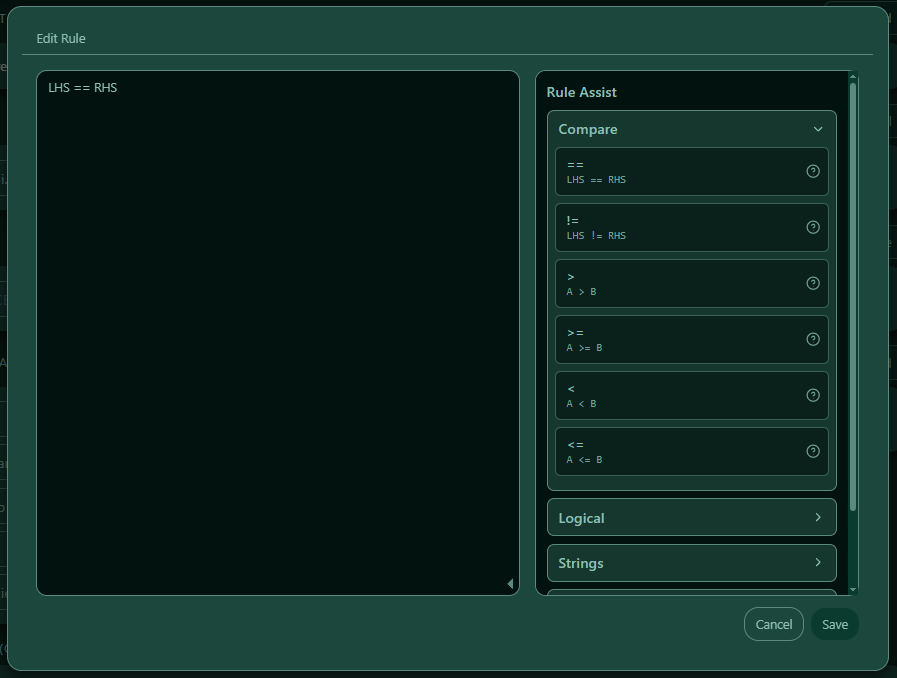
2.2 Advanced editor (free text + Assist)
Click the pencil to open a textarea and type a full CEL expression, e.g.
[amount] >= 100 && ([country] == "DE" || [country] == "AT")
The Rule Assist appears on the right side of the dialog. It is draggable, inserts snippets at the caret, and groups operators/helpers/patterns. Click Save to apply.
What you see
3) Rule Assistant (snippets & helpers)
The Assist panel documents common operators, helpers, and patterns; it also inserts ready‑made snippets:
- Stringy helpers: size(), lowerAscii(), upperAscii()
- List & math: max(), min(), sum(), avg(), join(), unique()
- Tip: inside string literals, write [[ and ]] to render [ and ]
4) Placeholders [key]
You can reference values from Payload, API extracts, and Contract Read aliases with bracket notation:
- Example: [amount], [iban], [price]
- Placeholders are case‑sensitive
- In strings: escape brackets with [[ and ]]
5) Operators & examples (by type family)
Payload values in rules are typed based on the configured schema. These are the valid payload field types:
string, bool, int64, int256, uint64, uint256, double, decimal, timestamp_ms, duration_ms, uuid, address, bytes, bytes32
For operator guidance in the UI, types are grouped into families:
- Stringy: string, uuid, address, bytes, bytes32
- Numeric: double, decimal, int64, int256, uint64, uint256, timestamp_ms, duration_ms
- Boolean: bool
Stringy: ==, !=, contains, startsWith, endsWith, matches, in
Numeric: ==, !=, >, >=, <, <=
Boolean: ==, !=
Logical: &&, ||, !
| Operator/Helper | Meaning | Example |
|---|---|---|
==, != |
equal / not equal | [country] == "DE" |
>, >=, <, <= |
numeric compare | [amount] >= 100 |
contains |
substring check | [iban].contains("DE") |
startsWith |
string prefix | [iban].startsWith("DE") |
endsWith |
string suffix | [iban].endsWith("00") |
matches |
RE2 regex match | [iban].matches("^DE\\d{2}.*$") |
in |
membership in list | [country] in ["DE","AT","CH"] |
size() |
length / size | [name].size() > 3 |
lowerAscii() / upperAscii() |
normalize case | [country].upperAscii() == "DE" |
&& / || / ! |
AND / OR / NOT | [country] == "DE" && [amount] >= 100 |
The advanced editor accepts any valid CEL the engine supports.
6) Validation (UI vs. runtime)
- The UI focuses on authoring assistance and does not hard‑fail during typing.
- Inputs are sanitized for bracket tokens and name patterns; autocomplete helps avoid typos.
- Strings use quotes
"..."; numbers are plain. - Full validation happens at runtime in the engine.
7) Examples
Simple
[country] == "DE" && [amount] >= 100
Whitelist
[country] in ["DE","AT","CH"]
String checks
[iban].startsWith("DE") && [name].size() >= 3
Case‑normalized compare
[country].upperAscii() == "DE"
8) Common Errors & Quick Fixes
- Unknown placeholder → use
[autocomplete to insert an existing key. - String without quotes → wrap with
"...". - Numeric comparison on stringy values → ensure the left side is numeric or convert upstream.
9) Outcome & Next Steps
When rules pass (all true), execution continues to onValid; otherwise onInvalid is used.
Next: configure Outputs and Output Payloads (you can reference placeholders and computed values there as well).
Appendix: Naming rules for placeholders
- Allowed pattern:
^[A-Za-z][A-Za-z0-9]*$ - Max length: 128
- Case‑sensitive and must be unique by exact spelling.