XGR Multi Bundle Deploy Panel
The Multi Bundle Deploy panel is the deployment workspace for XGR bundle artifacts. It imports deployable bundle data, validates XRC-137 and XRC-729 content, prepares the effective deploy signers, deploys or reuses contracts, writes deployed addresses back into the artifact and returns the result to the calling workflow when needed.
The panel is built for multi-user workflows. The connected wallet, the batch deploy signer, artifact owner aliases and per-contract signer overrides can all be different identities. This is important when different bundles, owners or deployers must be handled in one deploy run.
1. Panel overview
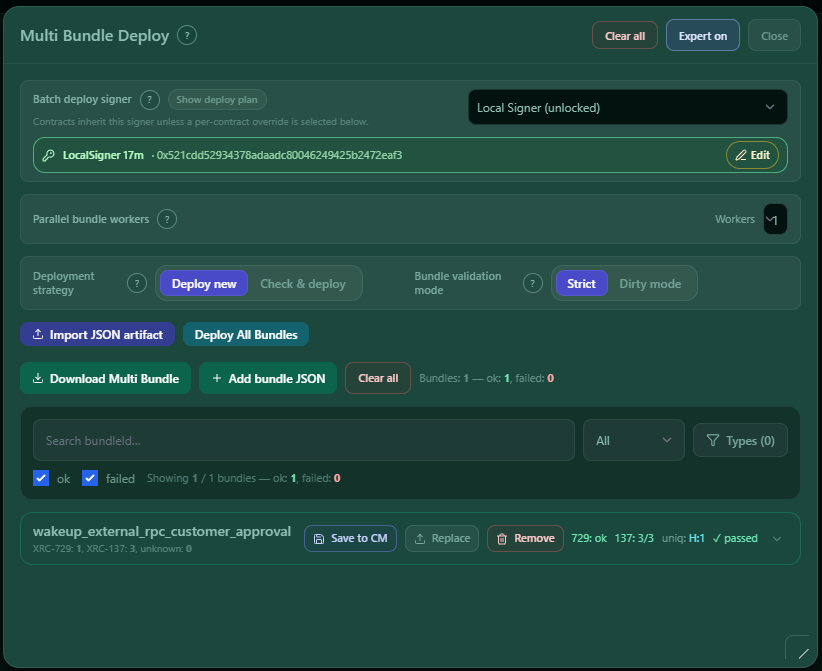
The panel header shows the workspace title Multi Bundle Deploy and the main panel controls:
| Control | Meaning |
|---|---|
| Clear all | Resets the current deploy workspace. |
| Expert | Switches from the simple workflow to advanced controls. |
| Expert on | Shows that Expert mode is active. |
| Close | Closes the panel or slide-in. |
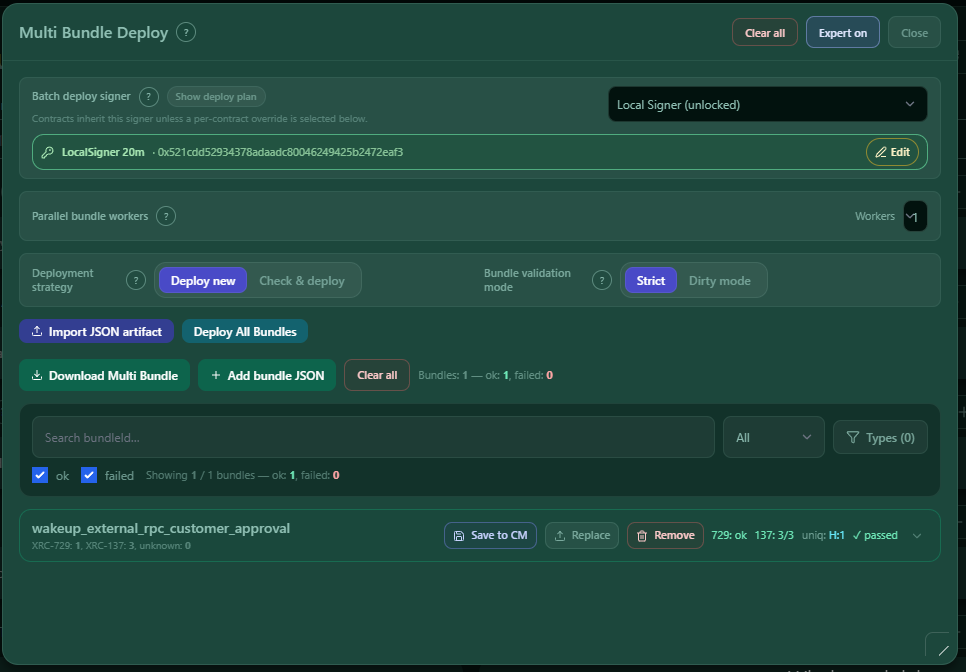
After an artifact is loaded, the panel shows signer readiness, deploy mode, validation mode, deploy/download buttons, bundle filters and one bundle report card per bundle.
2. What the panel is used for
Use Multi Bundle Deploy when a bundle, test plan or scenario still needs deployed contract addresses before the next step can run.
The panel can work with these input types:
| Input type | What the panel does with it |
|---|---|
xgr-multi-bundle@1 |
Uses the contained bundles directly. |
xgr.test-plan |
Extracts the embedded source bundle from the plan. |
xgr.multi-test-plan |
Extracts deployable bundles from all contained plans. |
xgr.test-scenario |
Extracts deployable bundles from the scenario plans. |
xgr.multi-test-scenario |
Extracts deployable bundles from all scenarios and their plans. |
When the input is a test plan or scenario artifact, the download keeps the original artifact type where possible and writes the new deployed addresses back into the embedded plans.
3. Import JSON artifact
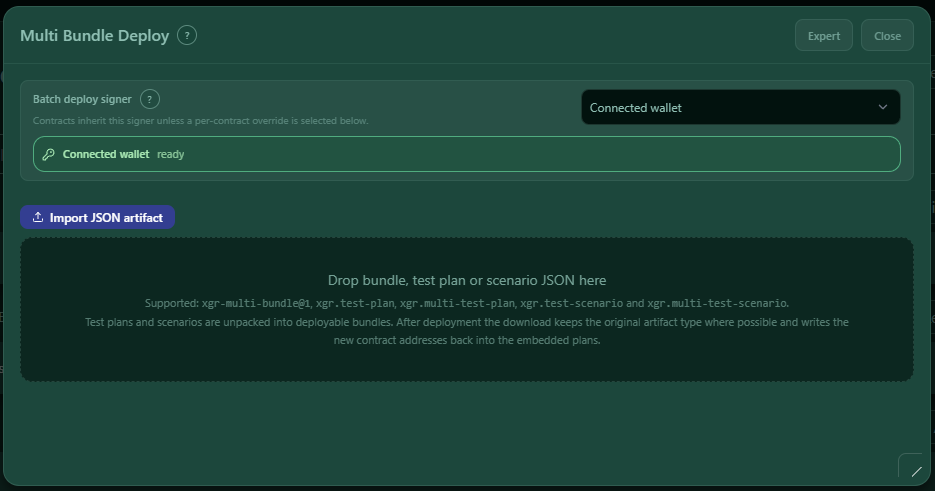
The first step is importing an artifact. Use Import JSON artifact or drag a JSON file into the drop area.
The drop area shows the supported formats directly in the UI:
xgr-multi-bundle@1xgr.test-planxgr.multi-test-planxgr.test-scenarioxgr.multi-test-scenario
What happens after import:
- The panel parses the JSON.
- If the file is a test plan or scenario, it extracts the embedded deployable bundles.
- It reads deploy signer defaults from plan owner aliases when available.
- It validates each bundle.
- It creates one report card per bundle.
- The workspace then shows deploy, download and Expert controls.
A valid multi-bundle file must use the canonical format xgr-multi-bundle@1 and must contain at least one bundle. Each bundle needs a non-empty bundleId and an items array.
4. Signer readiness
The top area shows the selected Batch deploy signer and its readiness state.
Common signer states are:
| State | Meaning |
|---|---|
| Connected wallet ready | The connected browser wallet can be used for inherited deploy operations. |
| LocalSigner ready | A local signer is selected and unlocked. |
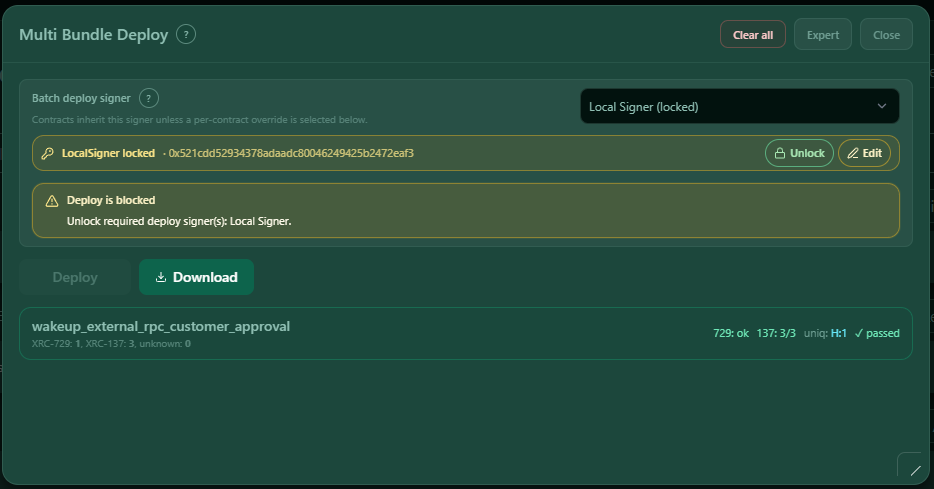
| LocalSigner locked | The selected local signer exists, but must be unlocked before deploy. |
| Deploy is blocked | At least one required signer is missing, locked or not ready. |
The signer row can show actions such as Unlock and Edit. Use Unlock when the selected signer is locked. Use Edit when the selected signer configuration must be changed.
The panel separates several signer concepts:
| Signer concept | Meaning |
|---|---|
| Connected wallet | The browser wallet connection. It may be used as the batch deploy signer or for wallet-based checks. |
| Batch deploy signer | The default signer for all contracts that inherit the header signer. |
| Alias signer | A named signer, for example owner, owner1 or a customer-defined deployer alias. |
| Local signer | A locally managed signer option. |
| Per-contract deploy signer | A signer override for one specific XRC-137 or XRC-729 row. |
If XRC-137 encryption is enabled, wallet and Read-Key readiness can also block deployment.
5. Simple mode workflow
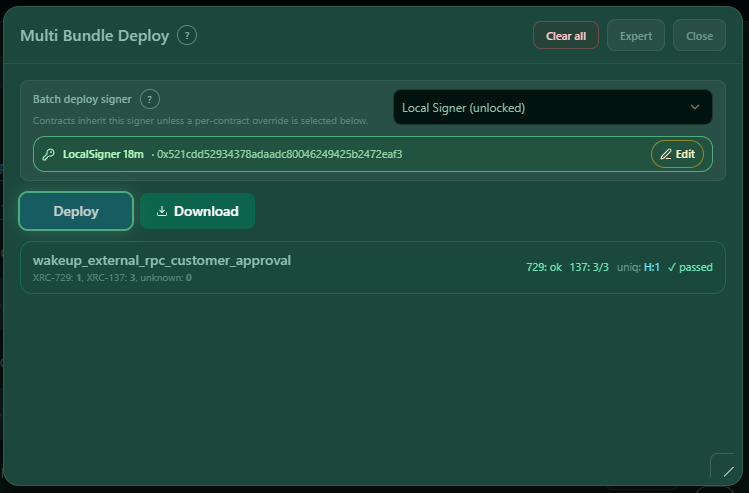
Simple mode is the default user path. It keeps the panel focused on the most important actions:
| Button / area | What it does |
|---|---|
| Deploy | Deploys all imported bundles with the default simple strategy. |
| Download | Downloads the current or updated output. |
| Expert | Opens advanced settings, filters, issue details and per-contract controls. |
| Clear all | Resets the workspace. |
| Close | Closes the panel. |
In simple mode the deploy mode is kept simple: the panel focuses on a clean deploy path. If validation or signer readiness needs attention, switch to Expert mode and inspect the details.
6. Expert mode controls
Expert mode exposes the advanced controls used for larger or more complex deployments.
Header actions in Expert mode
| Button | What it does |
|---|---|
| Import JSON artifact | Replaces the current import with another bundle, test plan or scenario artifact. |
| Deploy All Bundles | Deploys all currently loaded bundles. |
| Download Multi Bundle | Downloads the current multi-bundle draft before or after deployment. |
| Add bundle JSON | Adds one or more bundles to the current multi-bundle draft. |
| Clear all | Clears the full workspace. |
Batch deploy signer
The batch deploy signer is the default signer used by contracts that inherit the header signer. Per-contract overrides can still use another signer.
Use this when one deployer should sign most contracts, but a few contracts need different deployers.
Parallel bundle workers
Parallel bundle workers controls how many bundles are processed in parallel. This helps large multi-bundle files, but wallet/signing steps can still be serialized by signer and chain behavior. Do not use worker count as a replacement for signer planning.
Deploy mode
| Mode | Meaning |
|---|---|
| Deploy new | Deploys fresh contracts for the selected bundle data. |
| Check & deploy | Checks existing on-chain contracts. Matching contracts are reused; missing or mismatching contracts are deployed and written back. |
Use Deploy new when you need a fresh deployment. Use Check & deploy when existing addresses may already match the bundle and should be reused when safe.
Bundle validation mode
| Mode | Meaning |
|---|---|
| Strict | Stops deployment on validation errors. This is the safe default. |
| Dirty mode | Allows deployment attempts even when validation reports issues. Compile, deploy and on-chain runtime failures can still stop the flow. |
Use Dirty mode only for development and diagnostics. For customer handoff, Strict is safer.
7. Deploy plan preview
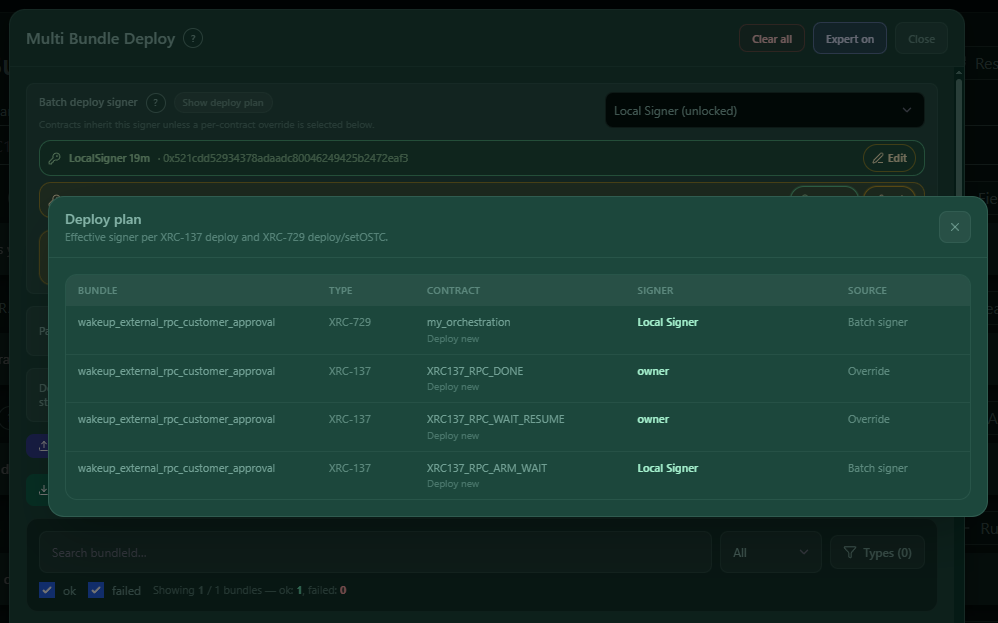
Use Show deploy plan before deploying multi-user or multi-signer artifacts.
The deploy plan preview shows the effective signer for each deploy operation. It helps answer these questions:
- Which signer deploys each XRC-137 contract?
- Which signer deploys or updates the XRC-729 container?
- Which signer calls
setOSTC? - Does a contract inherit the batch signer or use an override?
- Are owner/deployer aliases from the artifact applied correctly?
The deploy plan modal uses these columns:
| Column | Meaning |
|---|---|
| Artifact | The bundle or artifact id that owns the row. |
| Type | The deploy operation type, for example XRC-137, XRC-729 or XRC-729 setOSTC. |
| Contract | The alias, id or label for the contract. |
| Signer | The effective signer used for this operation. |
| Source | Where the signer came from, for example batch signer or override. |
Before a multi-user deployment, always check this preview. It prevents accidental deployment with the wrong wallet or deployer alias.
8. Per-contract settings and fixes
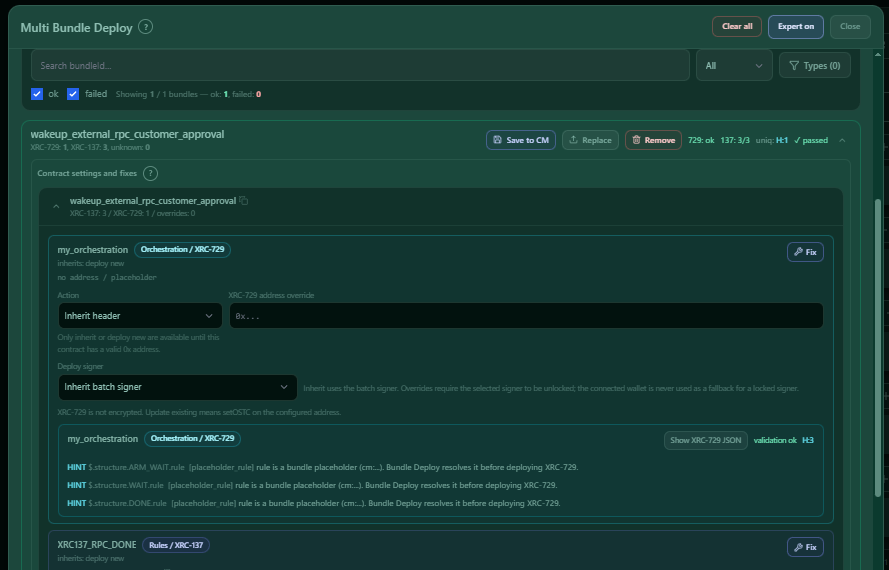
Expert mode can expand each bundle report. Inside the expanded bundle, Contract settings and fixes lets you override behavior for individual contracts.
Bundle row actions
| Button | Meaning |
|---|---|
| Save to CM | Saves the bundle to Contract Manager. When deploy results exist, the saved bundle uses the updated deployed addresses. |
| Replace | Replaces this bundle inside the current multi-bundle draft. The bundle id is kept. |
| Remove | Removes this bundle from the current multi-bundle draft. |
Contract action
Each contract can inherit the header action or override it.
| Action | Meaning |
|---|---|
| Inherit header | Uses the deploy mode selected in the panel header. |
| Deploy new | Always deploys this contract as a new contract. |
| Check & deploy | Checks this contract on-chain and reuses it only when it matches; otherwise deploys. |
| Update existing | Uses the configured existing address and updates the existing contract context. |
If a contract has no valid 0x... address, address-dependent actions are not available until a valid address is provided.
Address override
Use the XRC-137 or XRC-729 address override when one contract should use a different existing address than the source artifact. Empty override means no per-contract address override.
Deploy signer override
Use Deploy signer to override the batch signer for one contract. Inherited signers use the batch deploy signer. Overrides require the selected signer to be available and unlocked. The connected wallet is not used as a fallback for a locked signer.
Fix
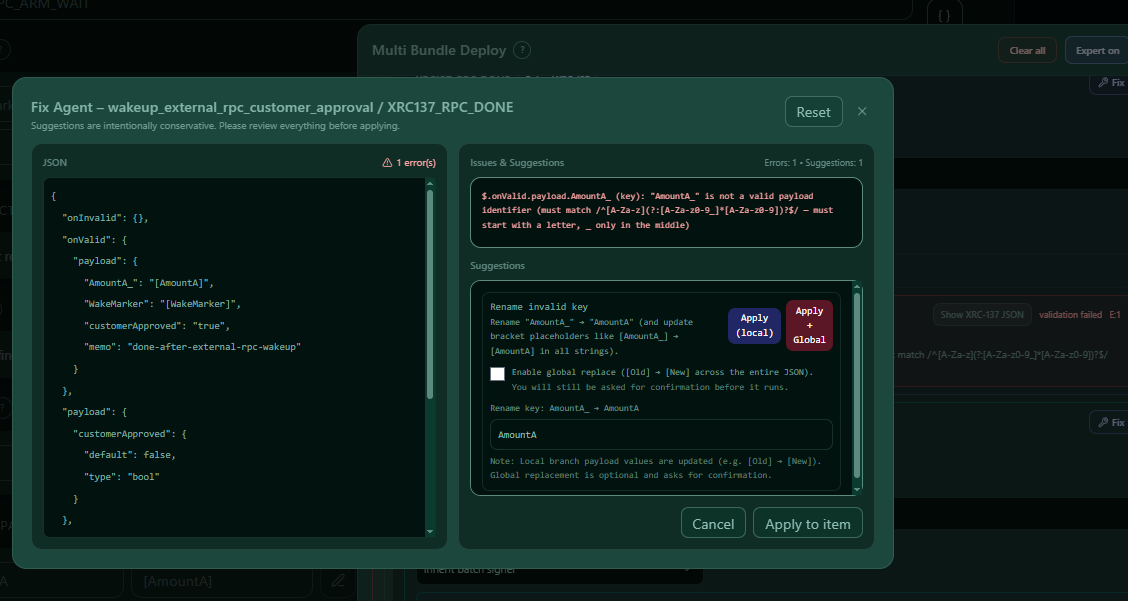
Fix opens the Fix Agent for that contract. Use it to repair bundle data before deployment. The Fix Agent shows the selected JSON and the relevant issues or suggested changes. Review staged changes before applying them.
XRC-137 encryption
For XRC-137 contracts, Expert mode can enable encryption after deploy, update or reuse. If encryption is enabled, wallet and Read-Key readiness are required. You can configure an encryption duration in years and days.
XRC-729 is not encrypted. For XRC-729, Update existing means calling setOSTC on the configured address.
9. Validation, issue filters and Fix Agent
The panel validates each bundle before deploy.
Validation covers:
- bundle parse and shape checks
- exactly one XRC-729 object per bundle
- XRC-137 validation
- XRC-729 validation with rule coverage and strict unknown checks
- issue statistics for errors, warnings and hints
In Expert mode, use the filters to reduce large multi-bundle files:
| Filter | Purpose |
|---|---|
| Search bundleId | Find a bundle by id. |
| Status ok / failed | Show only passing or failing bundles. |
| Severity dropdown | Show all bundles, only bundles with issues, only errors, only warnings or only hints. |
| Types | Filter by unique issue type. |
| Reset filters | Clear the active filter state. |
Each bundle report can show:
- XRC-729 status
- XRC-137 pass count
- parse errors
- deploy status
- unique error/warning/hint counts
- issue statistics
- parse / bundle shape issues
- bundle JSON viewer
- Fix Agent for targeted fixes
When the Fix Agent is open, review the JSON and issue cards carefully. Apply only the fixes that match your intended bundle behavior.
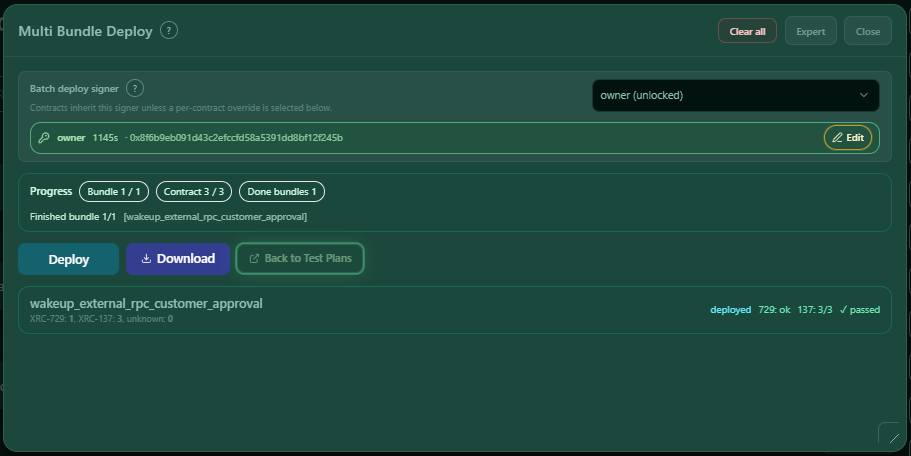
10. Deployment process, progress and cancel
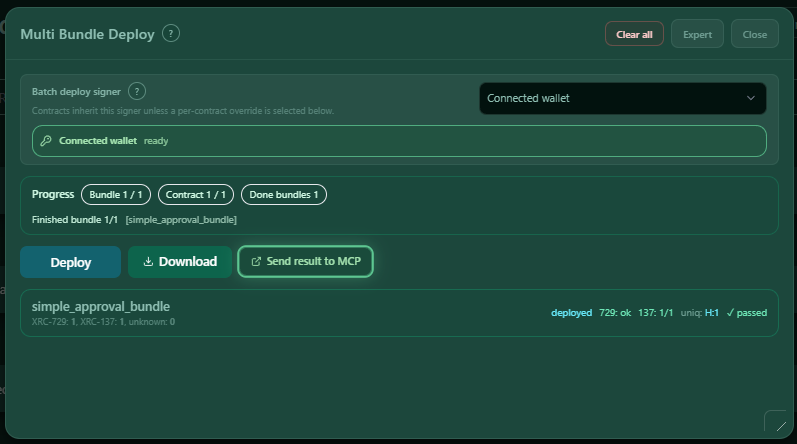
During deployment, the panel shows a Progress area with status pills such as bundle count, contract count and completed bundles.
The deployment process is:
- Validate the bundle.
- Resolve the required signer for XRC-137 deploys.
- Deploy, update or reuse each XRC-137 depending on deploy mode and per-contract settings.
- Replace XRC-137 placeholders in the XRC-729 structure.
- Deploy, reuse or update the XRC-729 container.
- Call
setOSTCon XRC-729 unless the existing XRC-729 was reused through a matching check. - Store deployed addresses, transaction hashes and replacement map.
- Build the updated multi-bundle or updated source artifact.
The progress area can show:
- current bundle
- total bundle count
- current contract count
- completed bundles
- current deploy phase
- cancellation state
Use Cancel deploy when the deploy should stop. The current wallet or signing step may still need to finish or be rejected once.
11. Download, return to Test Plans and MCP
After deployment, the panel can produce several outputs.
| Output action | What it does |
|---|---|
| Download | Downloads the currently available output in simple mode. |
| Download Multi Bundle | Downloads the current or updated multi-bundle JSON in Expert mode. |
| Download Artifact | Downloads the original artifact type when the panel was opened from a test plan or scenario artifact. |
| Save to CM | Saves a bundle into Contract Manager, using updated deploy results when available. |
| Back to Test Plans | Returns the deployed result to the Test Suite/Test Plans workflow when that return context exists. |
| Send result to MCP | Sends the deployed result back to the MCP handle when the panel was opened through MCP. |
| Retry MCP send | Retries a pending MCP result when a previous MCP send failed. |
If deployment is partial, the panel warns before download. Failed or incomplete bundles stay unchanged from the imported file.
12. Recommended flow
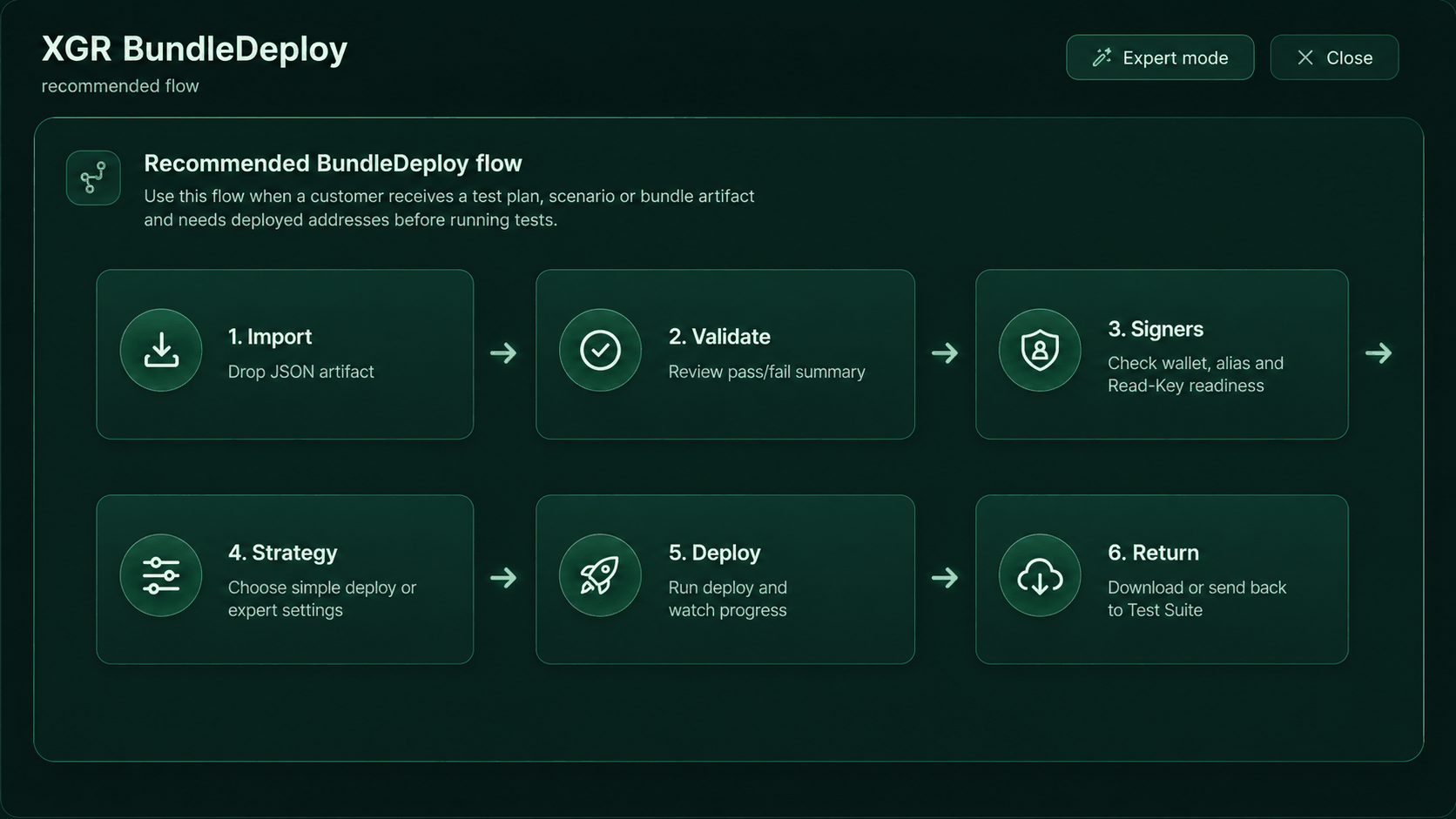
The recommended customer flow is:
- Import: Drop the JSON artifact or open the panel with a preloaded artifact.
- Validate: Review pass/fail summary and switch to Expert mode when issues exist.
- Signers: Check wallet, alias and Read-Key readiness.
- Strategy: Choose deploy mode and only use per-contract overrides where needed.
- Deploy: Run deploy and watch progress.
- Return: Download the updated artifact or return it to Test Plans/MCP.
For multi-user deployments, add one extra check before deploying: open Show deploy plan and verify every signer row.
13. Troubleshooting
Import says the file format is invalid
Check that the JSON is one of the supported artifact types. A direct bundle file must use format: "xgr-multi-bundle@1" and contain a non-empty bundles array.
Deploy is disabled
Common reasons:
- wallet not connected
- selected signer missing or locked
- Read-Key required for encryption
- validation errors in Strict mode
- deploy already running
- current workspace disabled by parent context
Deploy is blocked because a signer is locked
Check the readiness box below Batch deploy signer. Use Unlock for the locked signer or choose another signer from the dropdown. Then re-check the deploy plan.
Bundle validation needs attention
Switch to Expert mode. Use severity and type filters, then expand the bundle report. Check parse issues, XRC-729 issues and XRC-137 issues. Use Fix when the bundle data must be repaired.
Wrong signer would deploy a contract
Open Show deploy plan. If the signer is wrong, change the batch deploy signer or set a per-contract deploy signer override.
Existing address cannot be selected for update/check
The address must be a valid EVM 0x... address. Until a valid address exists, only inherit or deploy-new style actions are available.
Download after a partial deploy
The panel warns when the result is partial. Downloaded partial output keeps failed or incomplete bundles unchanged from the imported artifact.